Building Apple Vision Pro's Scroll Animation with Pure CSS: A Step-by-Step Replication
Overview
Apple's product animations, particularly their scrolling teardown effects, have long pushed the boundaries of web design. Traditionally, these rely on JavaScript and often sacrifice responsiveness—on smaller screens, they revert to static images. Inspired by the evolution of CSS, I set out to replicate the iconic Vision Pro animation using only CSS, ensuring it remains fully responsive. This article breaks down the process, from identifying the animation's two core stages—the 'exploding' hardware and the flip-up reveal—to overcoming challenges like cross-browser compatibility. While Apple's original works everywhere, this CSS-only version currently has a limitation in Firefox.
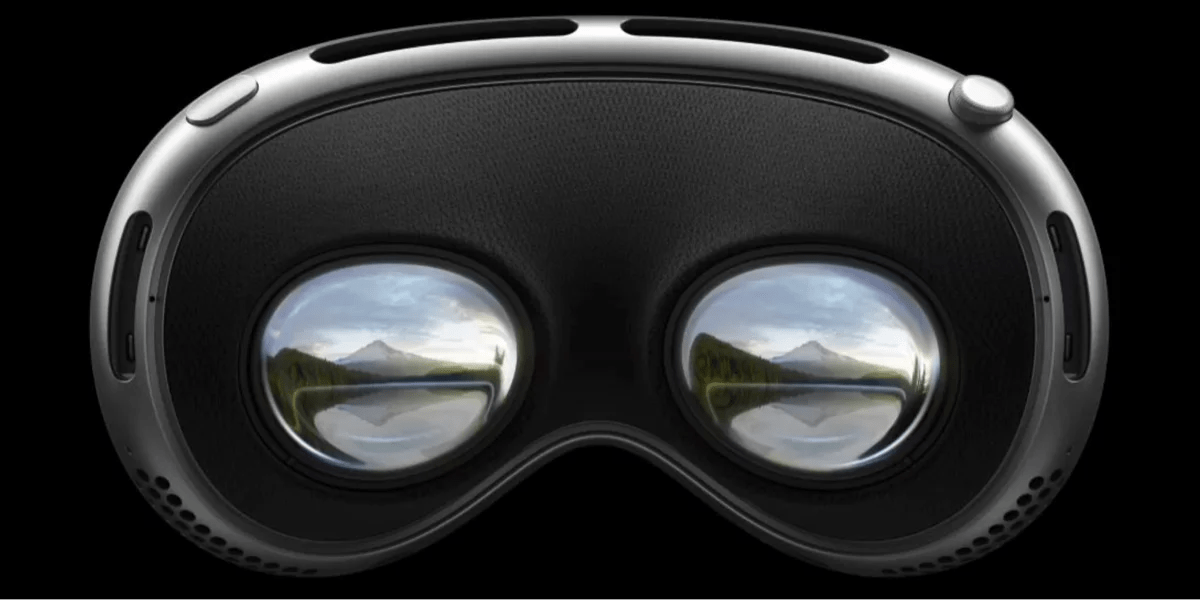
What inspired the attempt to recreate Apple's Vision Pro animation in CSS?
Apple's scrolling animations, particularly those on the Vision Pro product page, have always been a source of inspiration. They create a seamless, cinematic experience as users scroll, revealing hardware components in a layered, 3D-like sequence. Traditionally, such effects required JavaScript and often broke responsiveness—Apple itself switches to a static image at certain breakpoints. The recent advancements in CSS, especially with scroll-driven animations, sparked curiosity: could we achieve the same visual impact using only CSS, while making it inherently responsive? The challenge was both technical and creative—pushing CSS to its limits. The result is a purely stylesheet-based reconstruction that adapts to any viewport, preserving the original's dramatic reveal without a single line of JavaScript.
What are the two main stages of the original Vision Pro animation?
The animation unfolds in two distinct acts. Stage 1: "Exploding" Hardware – Three electronic components rise sequentially from the Vision Pro device anchored at the bottom of the page. Each component is made of two images—one in front, one behind—creating a layered, depth-rich effect reminiscent of a sub roll wrapped around a hot dog bun wrapped around a bread stick. The outermost component (the sub roll) contains both the frontmost and hindmost images, allowing it to appear simultaneously in front of and behind the inner components. Stage 2: Flip-Up to Eyepieces – The entire device pivots upward smoothly, revealing the eyepieces. Apple implements this part using a video, advancing it via JavaScript as the user scrolls. The CSS-only recreation had to mimic this with scroll-driven animations and clever use of background images.
How does the exploding hardware stage create a 3D effect?
The 3D illusion is achieved through strategic layering of transparent PNG images. Each of the three components is a pair: one image appears in front of the other components, and the other appears behind them. The outermost component (the sub roll in the analogy) uses its two images to sandwich the middle component (hot dog bun), which in turn wraps the innermost component (bread stick). This arrangement exploits the natural transparency of the images—gaps in one image allow the layers behind to show through, creating a sense of depth. In CSS, these layers are positioned absolutely within a container. Using background-position: bottom center and background-size: contain ensures the images stay anchored at the bottom and scale proportionally with the viewport. The scroll animation then moves each layer upward at a slightly different rate, amplifying the 3D effect as components appear to emerge from the device.
What challenges were encountered when recreating the animation with CSS?
Two major obstacles emerged during development. First, responsiveness – using <img> tags with position: fixed caused the images to overflow the viewport when the window shrank, breaking the layout. The solution came from studying Apple's approach: they used background images on <div>s with background-size: contain and background-position: bottom center. This made the images scale smoothly without cropping. Second, scrolling behavior – the Vision Pro device itself needed to scroll into and out of view naturally, but fixed positioning kept it stuck in place. Switching to relative positioning within a tall container, combined with scroll-driven animations, allowed the device to scroll away as the user continued down. Additionally, coordinating the timing of multiple layers without JavaScript required careful use of CSS animation delays tied to scroll progress.
How did the author solve the responsiveness and scrolling issues?
Responsiveness was fixed by abandoning <img> tags in favor of div elements with background-image. Each component layer received background-size: contain (scale to fit while preserving aspect ratio) and background-position: bottom center (keeps the images hugging the bottom edge). This approach eliminates overflow and ensures the composition adapts to any viewport width. For scrolling, the initial attempt used position: fixed to keep the stack at the bottom, but that prevented the device from scrolling out of view. The fix was to place all layers inside a container with position: relative and let the natural document flow handle vertical movement. Scroll-triggered animations were then applied using animation-timeline: scroll()—a newer CSS feature—to move layers upward as the user scrolls past the container. This also allowed the entire device to scroll off the top of the page naturally.
Why does the CSS-only version not work in Firefox?
At the time of writing, the CSS-only recreation relies heavily on the animation-timeline property, specifically the scroll() value, which is part of the CSS Scroll-Driven Animations specification. This feature allows animations to be driven by scroll position without JavaScript. However, Firefox has not yet implemented this specification—it remains behind a flag or completely unsupported. Consequently, the animated layers do not respond to scrolling in Firefox, breaking the desired effect. Apple's original animation works in Firefox because it uses JavaScript to advance a video or manipulate element positions frame by frame. Until Firefox ships animation-timeline or an alternative is found, users of that browser will see only the static image fallback or a non-animated version. This highlights the still-evolving nature of CSS and the ongoing differences in browser support for cutting-edge features.
How does the flip-up stage differ from the exploding hardware stage?
The flip-up stage is fundamentally different from the exploding hardware because it involves a continuous, smooth rotation of the entire device rather than discrete layers rising. In Apple's original, this is achieved with a video—a pre-rendered clip that plays forward as the user scrolls, controlled via JavaScript. The CSS-only recreation cannot use video clip advancement natively, so it must simulate the flip using 3D transforms. The device container is given perspective and a rotateX animation tied to scroll progress. As the user scrolls further, the rotation angle changes from 0° (device flat, showing front) to 90° (side view) and finally to 180° (showing eyepieces). Unlike the exploding stage, which uses multiple images sliding upward, the flip-up uses a single composite image (or a set of images showing the device at different angles) that rotates in 3D space. Timing is also more critical—the flip must begin precisely after the exploding stage completes, requiring careful coordination of scroll ranges.